For audit and tax firms in Cambodia

One digital office for your whole firm

Clients, engagements, monthly tax deadlines, timesheets, leave and the audit schedule in one place. Less paper, fewer missed deadlines, and a clear view of which audits pay off.

No sign-up needed for the demo. Example data only.

app.sarundesk.com
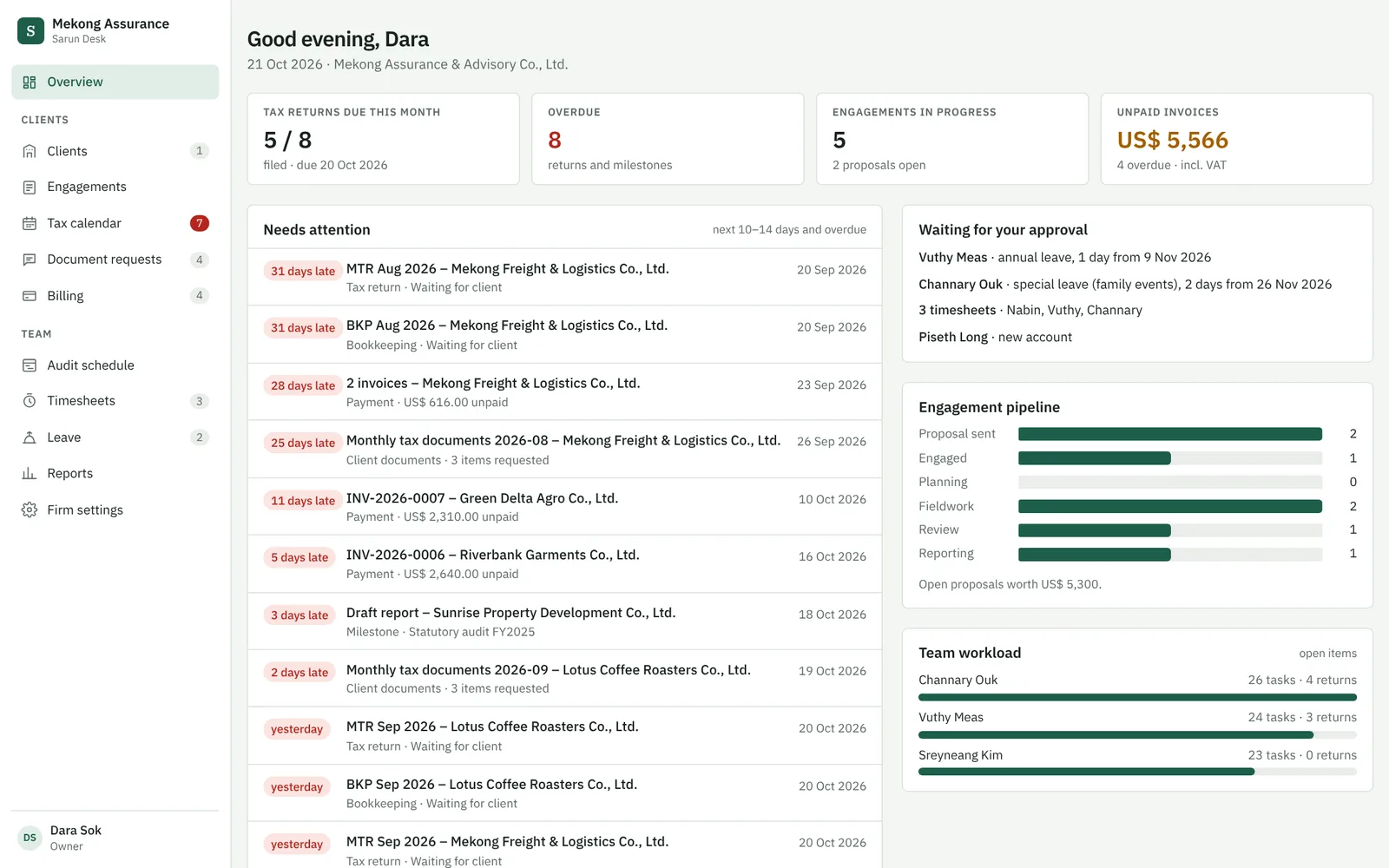
Sarun Desk overview: tax returns due, overdue items, engagements in progress, approvals waiting and the engagement pipeline
1place for clients, work and team
0software to install
30 daysfree trial, no card needed
US$flat monthly price per firm

Why firms switch

Your team is good at audit. The paperwork around it is what slows you down.

  • 01 · Deadlines

    Monthly returns for every client

    VAT, ToI, WHT, salary tax: dozens of deadlines a month, tracked in Excel and in people's heads.

  • 02 · Documents

    Chasing clients on Telegram

    Bank statements and invoices arrive in pieces, across chats and e-mails, and nobody knows what is still missing.

  • 03 · Time

    No idea if an audit pays off

    Hours, leave and staffing live on paper forms, so fees are set by feeling instead of facts.

What Sarun Desk does

From the first client form to the signed audit report

Tax calendar

Every client's monthly return, filed or late

Add a recurring service to a client once. Sarun Desk creates each new period automatically and shows who prepares it.

  • Monthly returns, bookkeeping, annual ToI return
  • Late items stand out in red
  • Linked to the documents still missing from the client
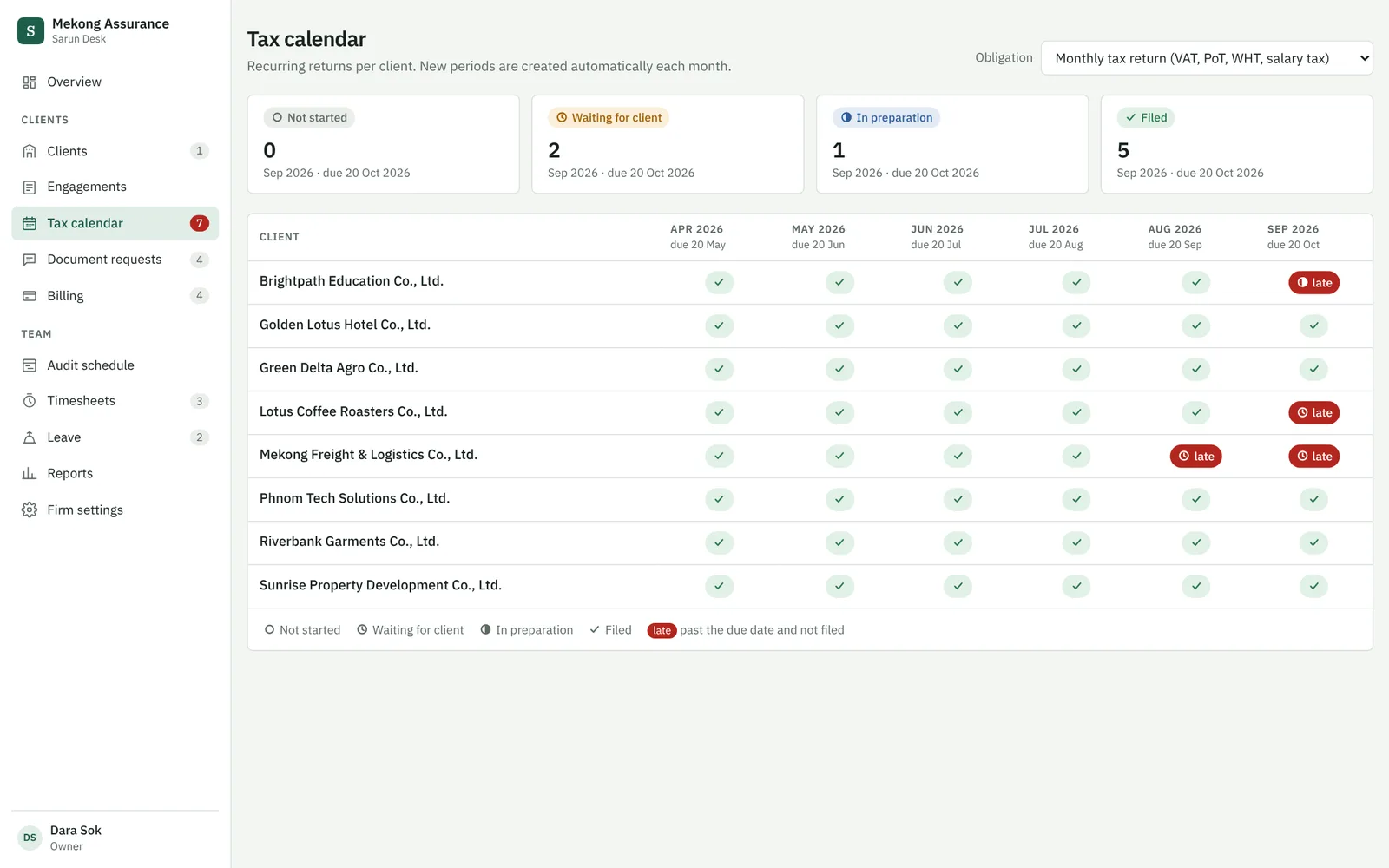
Tax calendar with one row per client and the status of each monthly return

Engagements

Proposal, engagement letter and invoices in one click

Your own templates, your wording. Fee, timeline and team are filled in from the engagement, in English and ready for Khmer translation.

  • Timeline: stock count, fieldwork, draft, signed report
  • Audit programme with tasks per staff member
  • 50% / 50% installment invoices with VAT
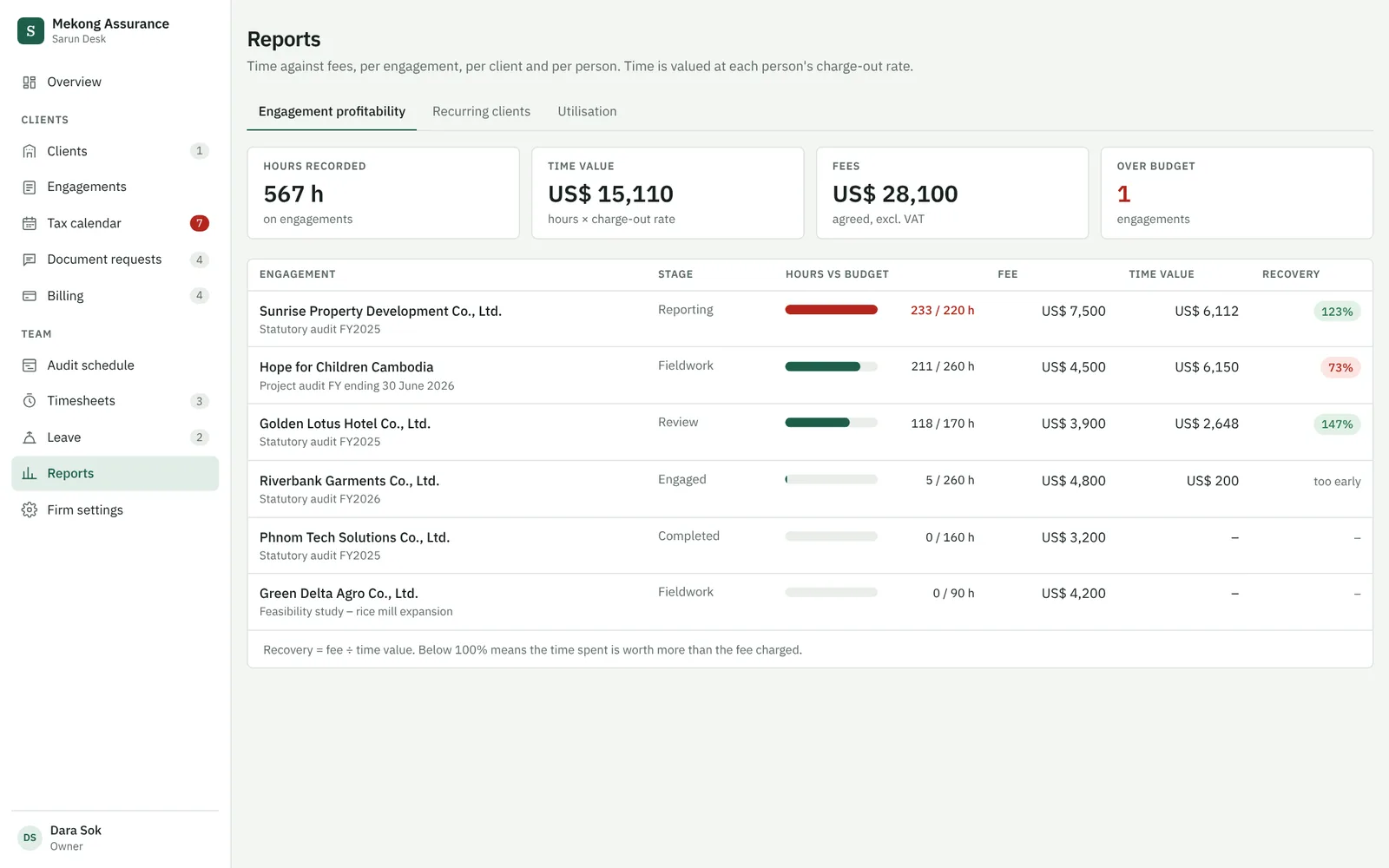
Engagement profitability report: hours against budget and recovery per audit

Audit schedule

Who works on which audit, week by week

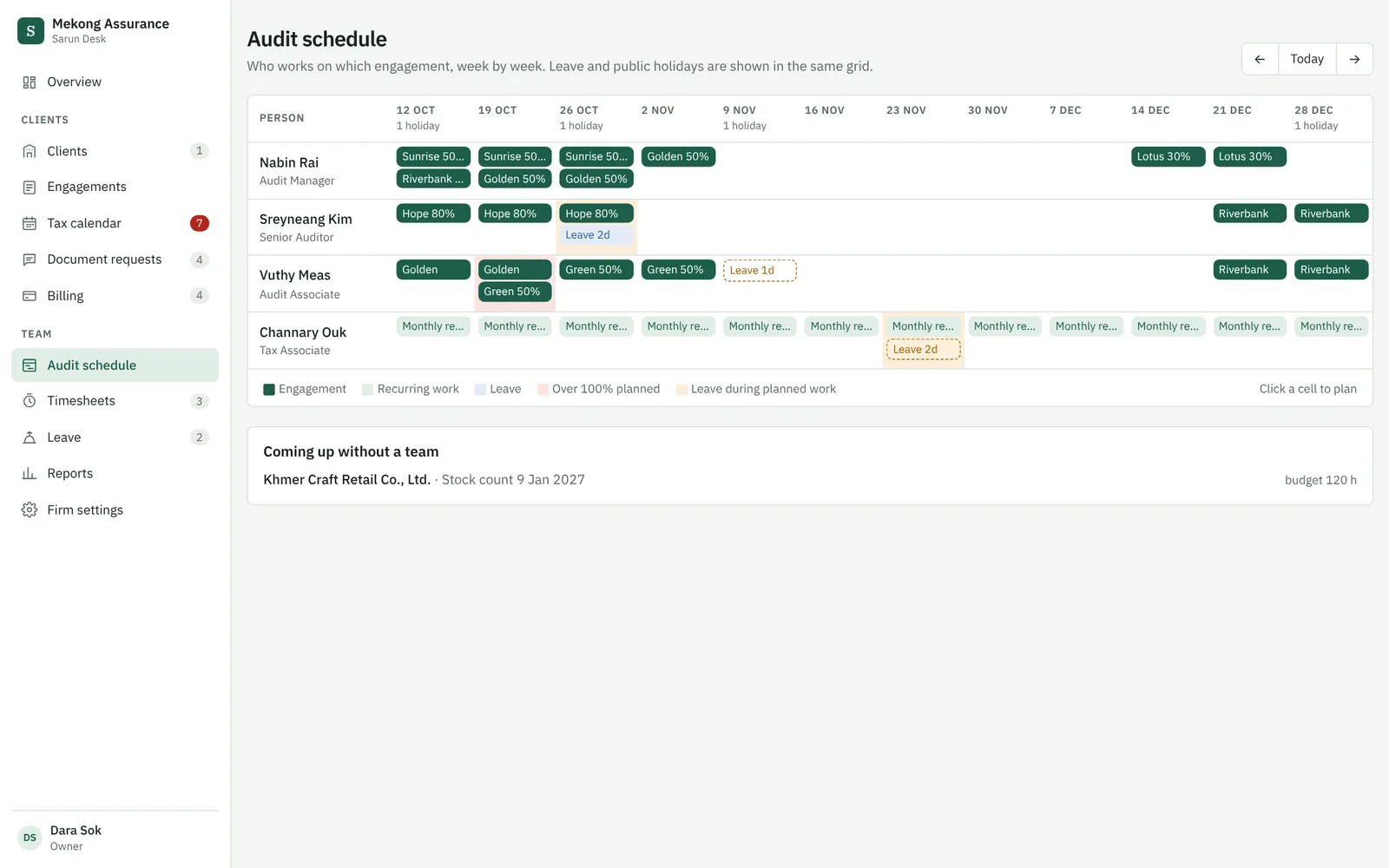
Plan your team across engagements and see clashes before they happen: overbooked staff, leave during fieldwork, audits without a team.

  • Leave and public holidays in the same plan
  • Partners and managers plan, staff see their weeks
Audit schedule grid with staff, weeks and planned engagements

Timesheets & leave

Hours per client, leave with one tap, no paper forms

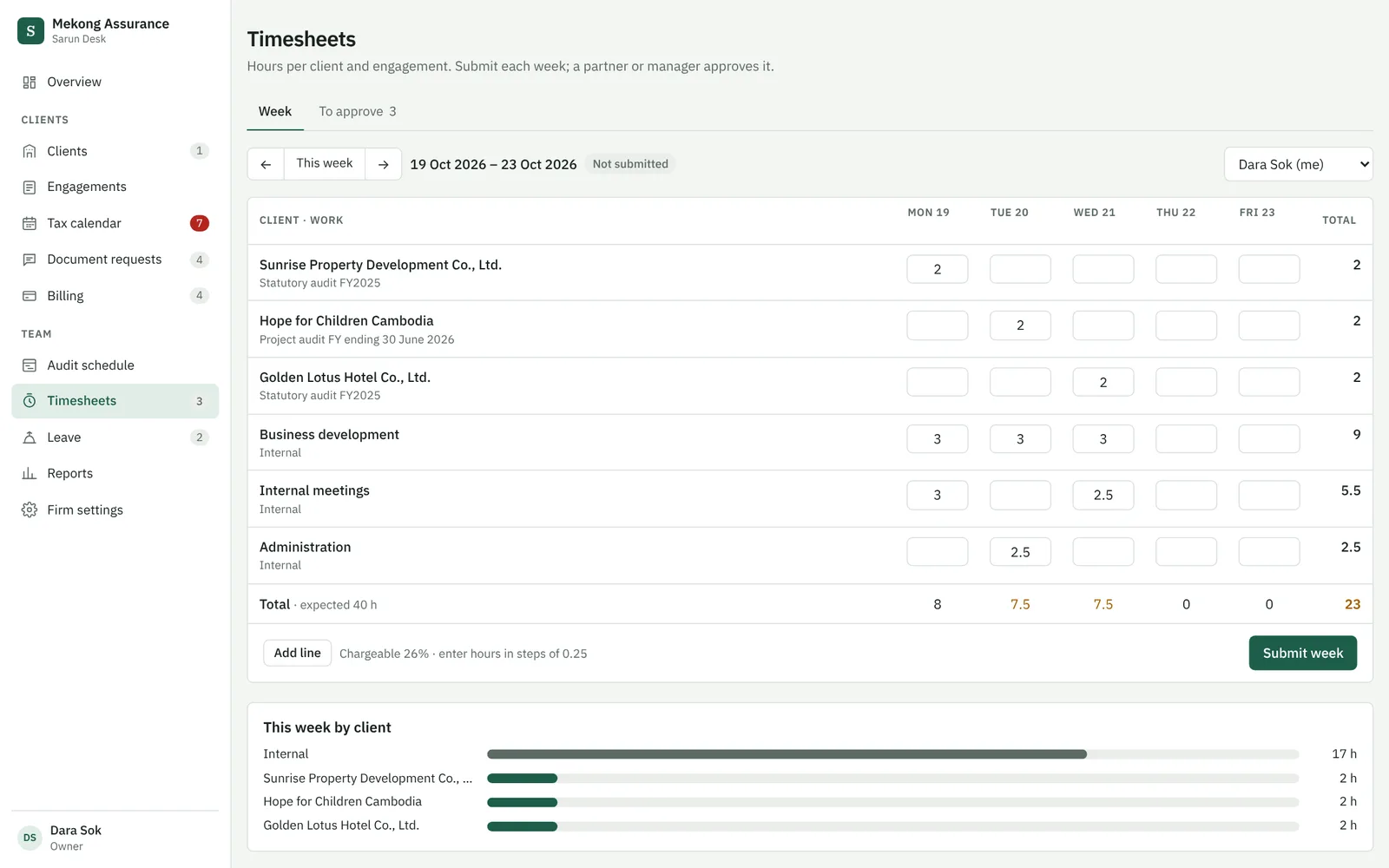
Staff book time per engagement and submit their week. Leave requests count working days, check the balance and warn when someone is planned on an audit.

  • Approval by partner or manager
  • Submitted weeks are locked
  • Utilisation per person against your target
Weekly timesheet with hours per client and day

Client management & KYC

Clients fill in your information form online. You review and approve it in one place.

Client portal

Clients upload the documents you ask for and see their invoices. They only ever see their own company.

Document requests

Ask once, track what arrived per item, and copy a ready reminder for Telegram or e-mail.

Billing overview

Monthly invoices for recurring services in one click, plus who is late and by how much.

Reports

Hours against budget, time value against fee, and which clients cost more than they pay.

Roles & approvals

Partners, managers and staff each see what they need. New accounts wait for approval.

Fits how you work today

Keep your files, your e-mail and your domain

No migration project. Sarun Desk works alongside what you already use.

Files stay where they are

Link each engagement to its folder on your Synology NAS, OneDrive or Google Drive.

Your e-mail addresses

Your team signs in with their existing work e-mail, for example Zoho or Gmail. No passwords to manage.

Your own address

Run it under your domain, for example app.yourfirm.com.

Your data, separated

Each firm's data is isolated in the database, hosted in Singapore with daily backups. Export it any time.

Pricing

One flat price per firm. Not per user.

Every plan starts with a 30-day free trial.

Starter

$99 / month
  • Up to 5 users
  • Clients, engagements, tax calendar
  • Timesheets, leave, audit schedule
  • Document templates
  • Support via Telegram and e-mail
Start free trial

Practice

$199 / month
  • Up to 25 users
  • Everything in Starter
  • Client portal for uploads and KYC
  • Reports: profitability and utilisation
  • Your own domain
Start free trial

Onboarding

from $500 once
  • Import of your clients and staff
  • Your proposal, engagement letter and invoice templates
  • Leave rules and public holidays
  • Training session for your team, on site in Phnom Penh or online
Ask for a quote

Prices in US dollars, excluding taxes. Monthly or yearly billing; yearly billing includes two months free. Cancel at the end of any billing period and take your data with you.

Questions

Good to know

Do we need to install anything?

No. Sarun Desk runs in the browser on computers, tablets and phones. Your team signs in with their work e-mail.

Where is our data stored, and who can see it?

In a database in Singapore with daily backups. Each firm's data is separated in the database itself: other firms cannot see it, and your clients only see their own company in the portal.

Can we keep our files on our own server?

Yes. Engagements link to your existing folders, for example on a Synology NAS. Only the documents clients upload through the portal are stored in Sarun Desk.

Can we use our own proposal and engagement letter wording?

Yes. Templates belong to your firm and can be edited at any time. During onboarding we set them up from your current Word documents.

How do we pay?

By invoice, monthly or yearly, payable by bank transfer in US dollars. Card payment is available on request.

What happens if we stop?

You can cancel at the end of any billing period and receive an export of all your data.

See it with your own firm in mind

Try the demo, then let's talk for 20 minutes about how your team works today.

Demosarundesk.com/demo
Based inSwitzerland & Cambodia